


Key takeaways
- Certificate lifetimes are dropping to 47 days by 2029. To keep up, organizations need to inventory every certificate they own, automate renewals, and adapt as standards change, so that frequent renewals run on their own instead of turning into outages.
- The reduction rolls out in three phases, with the first already in effect since March 2026 (200 days), followed by 100 days in March 2027 and 47 days in March 2029.
- Shorter lifetimes shrink your security exposure, remove the most common cause of outages, and make audits for frameworks like SOC 2 and HIPAA easier to pass.
- Certificate management is a business decision, not just an IT task, since failures hit uptime, customer trust, and the security reviews enterprise deals depend on.
- The same automation that handles frequent renewals also readies you for post-quantum encryption, turning the eventual switch to new standards into a routine update.
- A comprehensive certificate lifecycle management (CLM) solution will discover every certificate automatically, renew and deploy them hands-off across every environment, alert you before anything expires, and let you switch providers freely.
By 2029, the certificates that keep your website secure and online will expire four times more often than they do today. The CA/Browser Forum, the industry group that sets the standards browsers trust, voted in 2025 to shrink how long certificates stay valid. The first reduction took effect in March 2026. Two more follow in 2027 and 2029.
That pace changes the nature of the work. Certificate management stops being an occasional task and becomes something that has to be tracked and renewed constantly, across every site, app, and service you run.
Why is certificate management a business priority?
Every certificate is a piece of infrastructure your revenue quietly depends on. When a certificate expires, it’s your website, checkout, or login page that goes down, and your customers notice first. When an enterprise prospect runs a security review before signing, or asks you to prove certifications like SOC 2 or ISO 27001, your certificate practices are part of what they weigh.
As renewals move from once a year to every few weeks, someone has to own that work and fund the tools behind it. Those are leadership calls, not background IT tasks, and making them early is what keeps this change from becoming a disruption.
The 47-day certificate timeline
Maximum certificate lifetimes are shrinking in three stages. The endpoint is 47 days, down from 398.
| Effective Date | Maximum Certificate Lifetime | How Often You’ll Renew |
| Before March 2026 | 398 days | Once a year |
| March 15, 2026 | 200 days | Every 6 months |
| March 15, 2027 | 100 days | Every 3 months |
| March 15, 2029 | 47 days | Every 6 to 7 weeks |
By 2029, a certificate you used to renew once a year will need to be renewed roughly every six to seven weeks.
Why renewals get harder
The new rules tighten two things at once. Alongside shorter lifetimes, the period you can reuse proof that you own your domain is shrinking too.
Today, you verify domain ownership once and reuse that proof for months. That window narrows in step with the deadlines, and by March 2029, it drops to just 10 days. At that point, almost every renewal means re-proving ownership of your domain from scratch.
This is why the shift is more than a frequency problem. The shortcuts that make renewals painless today, like clicking a link in an email or dropping a file on a server, stop being practical when they have to happen every few weeks. The way through is automation that handles the validation step, too.
How to prepare for shorter certificate lifetimes
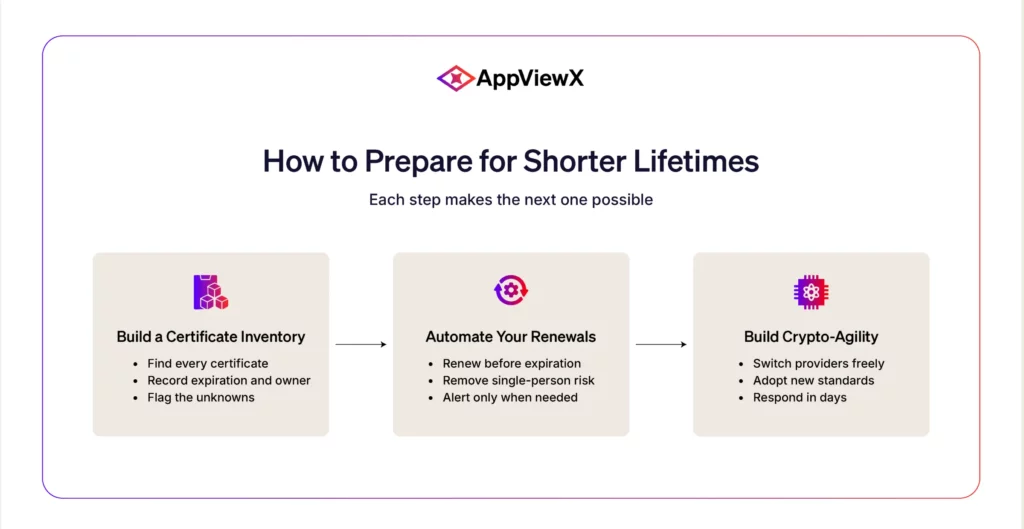
Preparing for shorter certificate lifespans starts with three steps: creating a complete inventory of your certificates, automating their renewals, and building the flexibility to adapt as standards change. The business owners who make these a priority today will be ready well ahead of each deadline, instead of scrambling at the last minute.
Build a certificate inventory
The certificates that cause outages are almost always the ones nobody knew were there. As people leave, teams reorganize, and old projects wind down, the certificates they set up keep running with no one left to track them.
- Find every certificate across your websites, apps, servers, and cloud services.
- Record when each one expires and who’s responsible for it.
- Flag the unknowns, the certificates nobody is accountable for anymore.
Automate your renewals
Once renewals hit every few weeks, manual processes can’t keep pace. Automation becomes essential.
- Set certificates to renew themselves well before they expire.
- Remove the single-person dependency so nothing breaks when someone’s on vacation.
- Get alerts only when something needs you, not for regular renewals that handle themselves.
This is the step that buys back the most time. Once discovery, renewal, validation, and deployment all run on their own, certificates stop being something anyone has to track or remember, and the every-few-weeks schedule simply takes care of itself. It also removes the most common cause of certificate outages, a renewal that quietly slipped past its deadline, because nothing depends on a person noticing in time.
Build crypto-agility
Crypto-agility is the ability to change your encryption quickly without rebuilding everything. It’s what keeps you flexible as standards keep shifting. Building crypto-agility means having three core capabilities:
- Switch certificate providers without a painful migration.
- Adopt new security standards as they’re released, including post-quantum encryption.
- Respond to industry changes in days instead of months.
This matters more than it first sounds. Certificate authorities do occasionally lose browser trust, and new standards like post-quantum encryption are already on the way, so a change you didn’t choose can land with little warning. Businesses built for agility absorb those moments as routine updates, while everyone else struggles to re-issue certificates across their whole environment under pressure.

What to do before each deadline
The three steps above don’t need to happen all at once. Each phase raises the bar, so the goal is to have the right piece in place before its deadline lands. The first phase is already here, which involves making a complete inventory and a renewal process that you trust as the immediate priority.
| Deadline | Maximum Validity | What to Do |
| In effect now (since March 2026) | 200 days |
|
| March 2027 | 100 days |
|
| March 2029 | 47 days |
|
Clear each marker on time, and the schedule stays manageable, instead of turning into a last-minute rush before 2029.
Are you prepared for the 47-day shift?
If you can confidently say yes to each of these, you’re in good shape. Each one reflects something a business ready for shorter lifetimes should be able to handle:
- You could get a complete list of every certificate your business relies on whenever you need it.
- If one expired tomorrow, you’d know before your customers did.
- Your last renewal happened without anyone doing it by hand.
- If the person who manages certificates left, nothing would quietly break.
- If a certificate authority were distrusted overnight, you could switch within days.
- If a customer asked for SOC 2 or HIPAA proof tomorrow, your certificate management wouldn’t be what slows you down.
The benefits of shorter certificate lifetimes
Shorter lifetimes make your business measurably safer and more resilient. The benefits reach well beyond security, improving how your business runs day to day and how customers and partners view it:
- A smaller window of exposure: A stolen certificate or key is only useful while it stays valid. Shrinking its life from a year to a few weeks means any compromise does far less damage and leaves far less to clean up.
- A live, accurate picture of what you own: Frequent renewals force an up-to-date inventory of every certificate across your business. The forgotten ones that quietly cause most outages stop hiding.
- Predictable uptime: Expired certificates are the leading cause of certificate-related downtime. Once renewals run on their own, that entire category of outage and the lost revenue behind it largely disappears.
- Smoother audits and security reviews: Frameworks like SOC 2, ISO 27001, HIPAA, and PCI DSS all expect encryption to be properly managed and kept current. A clean, automated certificate setup turns those audits and customer security reviews into quick and simple confirmations.
A head start on post-quantum security
NIST, the US government’s standards body, published its first post-quantum encryption standards in 2024. Its guidance gives organizations until 2030 to start retiring their current encryption and until 2035 to finish the move. The reason is quantum computing, which is expected to eventually break much of the encryption that secures the internet today.
Shorter certificate lifetimes work in your favor here. By the time these standards take hold, your renewals will already happen often, and your systems are built to change encryption easily. That turns the switch to post-quantum standards into an everyday update rather than a last-minute process. Being able to make that move smoothly is what’s known as post-quantum cryptographic agility, and a shorter-lifetime setup builds it almost by default.
These gains go to businesses that prepare ahead of each deadline rather than reacting to it.
What to look for in a certificate automation solution
Certificate tools vary widely in what they can actually do. The right one covers the essentials without charging you for features you’ll never use.
| Must-Have | Nice-to-Have |
| Automatic discovery of all your certificates | Custom reporting dashboards |
| Hands-off renewal and deployment | Pre-built integrations with niche tools |
| Works across cloud, on-prem, and hybrid setups | Advanced workflow customization |
| Freedom to switch certificate providers | Multi-language support |
| Alerts before anything expires | White-label options |
| Post-quantum readiness | Integrate with tools like Slack and Teams |
How AppViewX simplifies CLM
This is where AppViewX comes in. AppViewX automates certificate lifecycle management (CLM) end-to-end, giving you the visibility, automation, and control to handle shorter lifetimes without adding headcount.
- See every certificate across your entire business from one place.
- Renew automatically so 47-day cycles run themselves.
- Stay flexible with the freedom to switch providers and adopt new standards.
- Prevent outages before they happen, instead of reacting to them.
The timeline for shorter certificate lifetimes is fixed, but your position isn’t. Businesses that build automation now turn a mandatory change into a lasting advantage, less risk, fewer fire drills, and a security posture ready for whatever the industry decides next.

Tags
About the Author

Krupa Patil
Product Marketing Manager
A content creator focused on providing readers and prospective buyers with accurate, useful, and latest product information to help them make better informed decisions.