





SSL certificate expiration depends upon the NotAfter timestamp embedded in its certificate structure. Understanding the structure, exactly what happens during SSL certificate expiration, and why recovery is not instant helps security leaders build the case for proactive certificate lifecycle management.
Every digital certificate follows the X.509 standard defined in RFC 5280. Two of the fields from these standards control SSL certificate expiration:
Both timestamps use UTC format. When the current time exceeds the “Not After” value, the SSL certificate expires. There is no grace period specified. The boundary is absolute. This is why certificate management requires tracking expiration dates across your entire infrastructure.
The SSL certificate also contains other critical fields: the public key, the Certificate Authority identity, the subject (domain name), and a digital signature that proves authenticity. But the validity period is what triggers immediate rejection when expired.
Click the padlock icon in your browser’s address bar, select “Connection is secure,” then “Certificate is valid” to view the expiration date. For comprehensive analysis across multiple certificates, use AppViewX’s Free SSL/TLS Certificate Scan to identify expiration timelines, cryptographic weaknesses, and configuration issues before they cause outages.
Certificate validation occurs during the TLS handshake. This is the cryptographic negotiation that occurs whenever a client connects to a server over HTTPS. Here is the sequence:
The client establishes a TCP connection to port 443. At this point, no encryption exists. The TCP three-way handshake (SYN, SYN-ACK, ACK) simply creates the network path.
The client sends a Client Hello message. This includes supported TLS versions, cipher suites, and a random value. In TLS 1.3, the client also sends key shares to enable a faster one-round-trip handshake. The Server Name Indication (SNI) extension tells the server which hostname the client wants. This allows multiple certificates on a single IP address.
The server responds with a Server Hello, selects the TLS version and cipher suite, and sends its certificate chain. Critical: The server performs no validation on its own certificate. It simply delivers whatever is installed. An expired certificate is sent just as readily as a valid one. The server has no awareness of the problem.
The client receives the certificate and executes validation checks in a specific order. If any check fails, the handshake terminates:
| # | Validation Check | What Happens If It Fails |
| 1 | Parse X.509 structure | Malformed certificate; handshake aborts |
| 2 | Check validity period | Certificate expired; Fatal alert sent |
| 3 | Verify domain match (CN/SAN) | Name mismatch; connection blocked |
| 4 | Build and verify chain to root CA | Untrusted issuer; connection blocked |
| 5 | Check revocation (OCSP/CRL) | Revoked certificate; connection blocked |
| 6 | Verify Certificate Transparency SCTs | Missing SCTs; connection blocked (Chrome) |
Key point: The validity check (step 2) occurs early in the sequence. If it fails, the client does not proceed to chain verification, revocation checking, or any subsequent steps. Validation stops immediately.
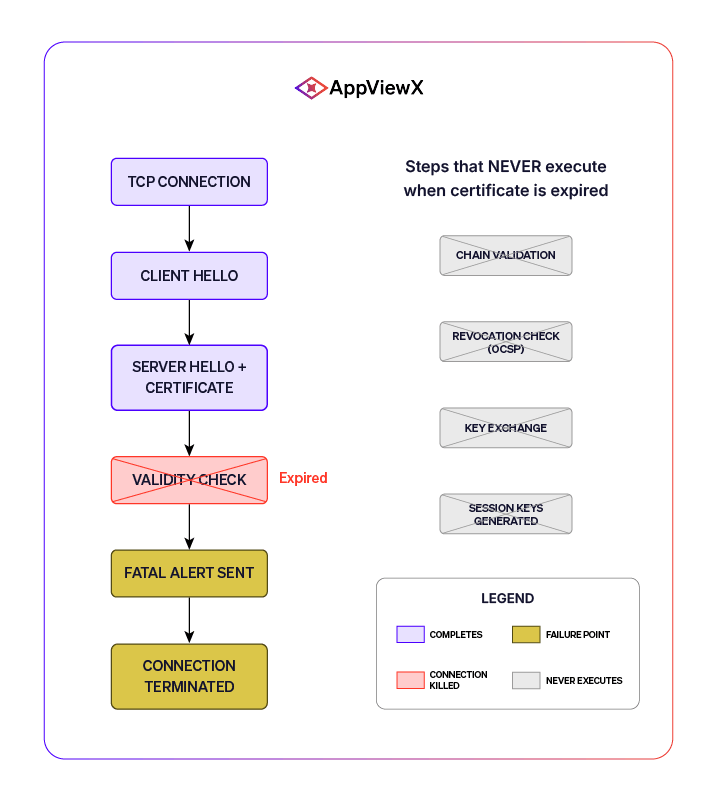
When the client detects an expired certificate, it sends a TLS Alert to the server. According to the TLS 1.3 specification (RFC 8446), this alert has two components:
A Fatal alert requires immediate termination of the connection. The client closes the TCP connection (typically via TCP FIN or RST packet). No session keys are generated. No application data is exchanged. The handshake fails completely. This is different from a Warning-level alert, which allows the connection to continue.
The server receives the Fatal alert and logs an error. Common server-side log entries include SSL_ERROR_SSL or “connection reset by peer”. The server cannot fix the problem mid-handshake. It can only wait for a new connection after the certificate is replaced.
Browsers display full-page warnings. Applications throw exceptions:
Certificates exist in a chain of trust: Root CA → Intermediate CA → End-entity certificate. The client must verify the entire chain. If any certificate in the chain expires, the entire chain is invalid.
| Chain Level | Typical Validity | Expiration Impact |
| Root CA | 20–25 years | Rare; affects all certificates issued under that root |
| Intermediate CA | 5–10 years | All end-entity certs under that intermediate become invalid |
| End-entity | 398 → 47 days* | Only that specific server or service is affected |
*The CA/Browser Forum has mandated 47-day maximum validity by March 2029.
Browsers typically allow users to click through certificate warnings. HTTP Strict Transport Security (HSTS) removes this option.
When a site sends an HSTS header or appears on the browser’s preload list, the browser enforces strict HTTPS. If the certificate is expired, the bypass option is removed entirely. There is no “Advanced” button. There is no “Proceed anyway.” The site is inaccessible until the certificate is replaced.
Sites on the HSTS preload list (including google.com, facebook.com, paypal.com, and thousands more) have never had a bypass option. This is why certificate lifecycle automation is critical for any organization with HSTS-enabled domains.
When an API client, microservice, or IoT device encounters an expired certificate, there is no warning screen. There is no user to click “proceed anyway.” The client receives the Fatal alert and terminates. The connection fails silently.
According to NIST Special Publication 1800-16, internal certificates often outnumber public certificates by significant margins. Organizations may have dozens of public-facing certificates but thousands of internal certificates securing APIs, databases, and microservices. These are the certificates that typically receive less attention, yet their expiration causes the most disruption.
A single expired certificate on an authentication service can lock out all users. An expired certificate on a payment API can halt all transactions. These failures cascade through dependent systems. This is why certificate discovery and scanning across your entire infrastructure is essential.
Deploying a new certificate does not restore service instantly. Multiple caching layers delay full recovery:
| Caching Layer | Problem | Typical Delay |
| OCSP stapling cache | The server serves an old OCSP response | Hours to days |
| CDN edge nodes | Old certificate until propagation completes | Minutes to hours |
| Browser cache | Cached negative validation result | Minutes to hours |
| CT log propagation | New certificate SCTs not yet available | Usually immediate |
In order to mitigate this, Restart the web server to clear the OCSP cache. Purge the CDN cache. Instruct users to clear browser cache or restart browsers. Verify that Signed Certificate Timestamps (SCTs) are embedded before considering deployment complete.
The only way to avoid recovery lag entirely is to renew certificates before they expire. Certificate lifecycle management platforms automate this process, ensuring certificates are renewed well before expiration.
Automated certificate lifecycle management eliminates the risk of expiration by renewing certificates before they expire. Learn how AppViewX delivers visibility, automation, and control across your entire certificate inventory.