


Key Takeaways
-
- Automating certificate management inside Azure Key Vault requires a CLM-platform with native Azure integrations, multi-CA support, and complete certificate lifecycle orchestration.
- While Azure Key Vault has earned a reputation as a leading storage for certificates, keys, and secrets, its built-in management features have practical limitations that will not work at the enterprise level or across multiple-cloud environments.
- Automation has become more vital than ever as certificate lifespans are continuing to shorten from today’s 200 days to 47 days by March 2029.
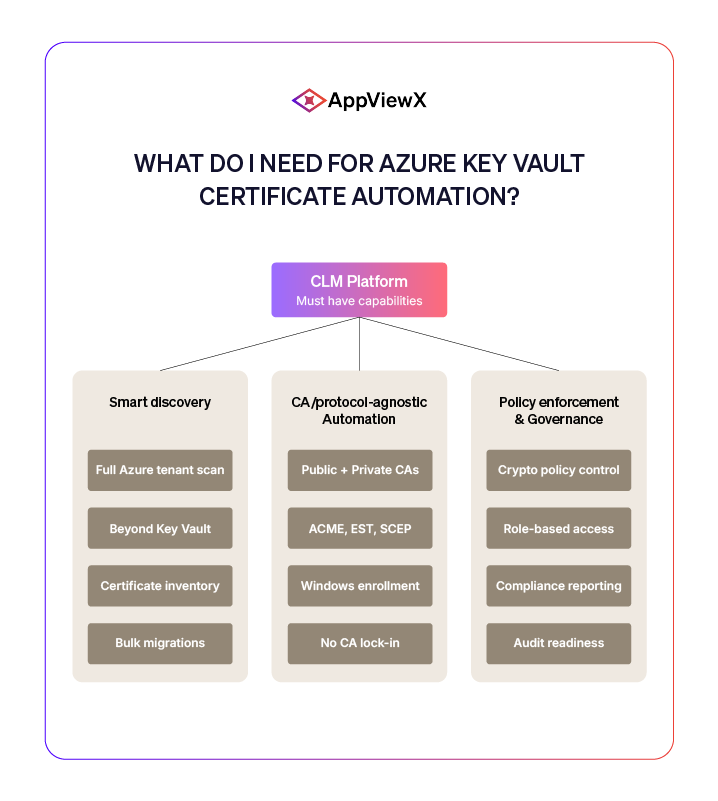
- Smart discovery, CA/ protocol-agnostic automation, and policy enforcement & governance are the three pillars for certificate automation within Azure Key Vault.
- Enterprises running Azure need a CLM tool that can provide complete visibility over their entire certificate infrastructure to avoid the risks that come with hidden or expired certificates.
The Pros and Cons of Azure Key Vault
Azure Key Vault, known for providing centralized storage for certificates, keys, and secrets, has become one of the key security services offered by Microsoft. It has a FIPS 140-3 Level 3 validated HSM-backed key protection in the Premium tier and integration with Microsoft Entra ID for role-based access control. Key Vault’s native certificate features can handle tasks related to issuance and renewal, making it ideal for teams that work within Azure or manage a small certificate portfolio via a single certificate authority (CA).
For enterprises, this may not be enough. If you’re processing multiple certificates across various environments, such as Azure App Service, Azure Front Door, Azure Kubernetes Service (AKS), Application Gateway, and on-premise systems all at once, the limitations could impact operations. It’s worth noting that Key Vault’s auto-renewal feature works exclusively with its partnered CAs (DigiCert and GlobalSign). This means you need to undergo manual renewal workflows if your organization uses other public or private CAs. Another thing about Azure Key Vault is that it does not offer complete or cross-cloud visibility over your certificate landscape, which isn’t ideal if you’re running a multi-cloud environment, like, according to research conducted by CloudZero, 94% of companies now do.
This does not mean that Azure Key Vault is inadequate. Rather, enterprise certificate management demands solutions capable of going beyond a single cloud system, manual workflows, and native tools. While some certificates are stored in Key Vault, others may be found in load balances, application gateways, ingress controllers, service meshes, and various endpoints that fall outside of Key Vault’s scope.
Thankfully, certificate lifecycle management platforms can bridge the gap between Key Vault’s offerings and enterprise-level certificate demands. Instead of replacing it, CLM platforms will serve as the orchestration layer that will enable Key Vault to operate within an automated, CA-agnostic, and policy-driven certificate ecosystem.
Why is automation important in the 47-day certificate validity era?
The phased reduction of certificate validity has already begun. This comes after the CA/ Browser Forum’s approval of Ballot SC081v3, which effectively shortened the lifespan of certificates to 200 days in March 2026, and will reduce it to 100 days by March 2027, before ultimately turning it to 47 days by March 2029. This is also the reason why manual certificate management within Azure Key Vault is unsustainable and impractical.
Picture this: you’re managing over 1,000 certificates under the 47-day mandate. Such a number requires running approximately 21 certificate operations every single day, excluding weekends and holidays. Based on data from AppViewX, automation can greatly reduce certificate management time by 73-82%. Thus, cutting hundreds of hours spent on labor to a mere fraction of that workload. Automation is now a non-negotiable requirement if you are aiming for excellence when it comes to certificate management.
The urgency of this matter is reflected in the CA market itself. SNS Insider emphasizes that the global certificate authority market is expected to hit $442.2 million by 2032, which is a 11.4% CAGR. This surge can be attributed to the need for automated issuance and renewal to meet the ever-increasing certificate volumes. On the other hand, Gartner’s 2025 Buyers’ Guide for PKI and Certificate Lifecycle Management cites visibility, automation, and crypto-agility as the three cornerstones that enterprises should look into when evaluating CLM platforms.
It is clear that this is no longer about whether or not you should automate certificate management within Azure Key Vault. Rather, it is about how you can build an automated CLM system that covers your whole certificate posture and can thrive under the 47-day mandate.
Manual vs. automated Azure Key Vault certificate management
The table below outlines the difference between working exclusively with Azure Key Vault’s tools and capabilities and combining them with the features of a CLM platform:
| Capability | Azure Key Vault Native | Azure Key Vault + CLM Platform |
| Certificate discovery across Azure services | Limited to Key Vault-stored certificates | Full discovery across Key Vault, App Service, AKS, Front Door, and more |
| Multi-CA support | DigiCert and GlobalSign only | Any public or private CA via closed-loop automation |
| Renewal automation | Basic auto-renewal for partner CAs | End-to-end automation with policy enforcement and approval workflows |
| Cross-cloud visibility | Azure-only scope | Unified view spanning Azure, AWS, GCP, on-premises, and hybrid |
| Compliance reporting | Manual export via Azure Monitor and Log Analytics | Automated crypto-resilience scorecards and audit-ready dashboards |
| 47-day readiness | No native short-lifecycle tooling | Purpose-built for high-frequency renewal cycles at scale |
What do I need for Azure Key Vault certificate automation?
Now that we know just how crucial automation is in effectively leveraging Azure Key Vault, it’s time to dive into the features you need to prioritize when choosing a CLM solution. Bear in mind, there are numerous vendors out there, all claiming that their products offer automation. So it is vital that you are able to recognize actual capabilities from aspirational ones. Here are the three most important elements to look for in a CLM platform:
Smart Discovery
It goes without saying that you cannot fix what you cannot see, thereby making discovery one of the most important aspects of certificate management. A lot of organizations tend to discover 5 to 10 times more certificates than expected when they run a comprehensive scan of their security system. That’s because certificates are spread across different environments.
A CLM platform capable of onboarding your Azure tenant and surfacing all of your certificates, regardless of their location, can be a huge advantage. For example, AppViewX has a smart discovery feature that can connect with Azure accounts and scan every associated service to create a full certificate inventory. Having this breadth of discovery will give you a panoramic view of your certificate environment, preventing any expiring certificates from going unnoticed.
In case you already have certificates in Azure Key Vault, AppViewX also allows native integration that simplifies single-click and bulk certificate migrations alike.
CA/ protocol-agnostic automation
Azure Key Vault’s limited CA partnership framework can be an impediment, especially for enterprises that work with a mix of public and private CAs. To address this, you need to work with a CLM solution that can support both types of CAs as well as the auto-enrollment protocols responsible for ensuring the seamlessness of certificate issuance, like ACME, EST, SCEP, CMP, and native Windows auto-enrollment.
Policy enforcement and governance
It’s no secret that automation without governance is risky. Defining and implementing organization-wide cryptographic policies, such as specifying approved CAs and algorithms, minimum key lengths, and certificate ownership, is a must if you want to keep your certificate infrastructure up to standard.
Choose a CLM platform offering enterprise identity governance with role-based access control to enable DevOps teams to self-service certificate requests and InfoSec to maintain policy authority. To avoid the need for manual evidence consolidation, you should also consider working with a CLM solution that provides compliance policy enforcement and reporting.
Feature evaluation matrix for Azure Key Vault CLM integration
TO help you distinguish true capabilities from marketing noise, consider looking into the following criteria:
| Evaluation Criteria | Questions to Ask Vendors | Red Flags |
| Discovery depth | Does it scan beyond Key Vault? Does it cover App Gateway, AKS, Front Door, and App Service? | Discovery limited to Key Vault-stored certs only |
| CA flexibility | How many public and private CAs are supported? Is there CA lock-in? | Support for fewer than 3 CAs; no private CA support |
| Protocol support | Does it support ACME, EST, SCEP, CMP, and Windows auto-enrollment? | ACME-only or no protocol-based auto-enrollment |
| Policy enforcement | Can you define and enforce crypto policies centrally? Is RBAC granular? | No policy engine; governance bolted on as reporting only |
| Multi-cloud reach | Does a single platform manage Azure, AWS, GCP, and on-prem? | Separate tools or modules required per cloud provider |
| PQC readiness | Does it support post-quantum algorithm assessment and migration? | No PQC roadmap or crypto-agility features |
Azure Key Vault certificate automation strategy
While automating your Azure Key Vault workflows may seem daunting, it can be achieved through a phased approach involving three practical steps that bring value and help build automation at enterprise-scale:
Phase 1: Discover (Weeks 1 – 3)
In this step, you need to run a smart discovery scan across all Azure services (Key Vault, App Service, AKS, Application Gateway, Front Door, and on-premise or hybrid endpoints) to get a complete view of your current certificate landscape. This will also help in consolidating your certificate inventory with chain-of-trust mapping, expiration timelines, and ownership attribution. Shadow certificates and orphaned keys usually show up during discovery, allowing you to address them before they cause significant damage to your security system.
Phase 2: Automate (Weeks 4 – 8)
You need to configure your integrations with your chosen CAs, whether they’re public or private. Make sure to automate your certificate management processes with ACME and EST protocols to reduce the need for manual labor. That way, you can avoid any human errors from impacting your daily operations. You should also consider enabling closed-loop automation that can handle CSR generation, CA submission, certificate issuance, deployment to the correct Azure endpoints, and post-deployment validation. This ensures continuous renewals protect your whole security posture against certificate-related threats.
Phase 3: Govern (Weeks 9 – 12)
Once you have a clear inventory and automated certificate management system, you can now focus on implementing and enforcing enterprise crypto policies such as approved CAs, minimum RSA key sizes, and algorithm restrictions. This is also where you should set up role-based access control to give specific teams and individuals the appropriate permissions necessary to carry out their tasks without having to constantly seek approvals. Another thing you can try is enabling compliance dashboards and crypto-resilience scorecards to maintain audit-readiness.
Make your Azure automation strategy work for you
Managing certificates within Azure Key Vault involves substantial effort since you will likely be navigating multiple environments. And manual workflows simply won’t cut it once the 47-day validity timeline is the new reality. Now that we understand what the challenges are, it all boils down to selecting the right automation platform that can complement Key Vault, and ensure seamless and secure operations.
There are a number of reasons why AppViewX is the best choice for this endeavor, the main one being that it is recognized as a Leader in the IDC MarketScape for Worldwide Certificate Lifecycle Management Software 2026. One of the big perks of the AppViewX CLM platform is its native integration with Azure Key Vault, therefore making it easier to build a unified certificate management system.
Run a free SSL/ TLS certificate scan for instant visibility into the current state of your certificate landscape or book a demo now to see how AppViewX can transform your Azure Key Vault automation strategy.
Tags
About the Author

Ganesh Mallaya
Global Field CTO
Enabling businesses to design, engineer and deploy automation and Digital trust management solutions.