





Key takeaways
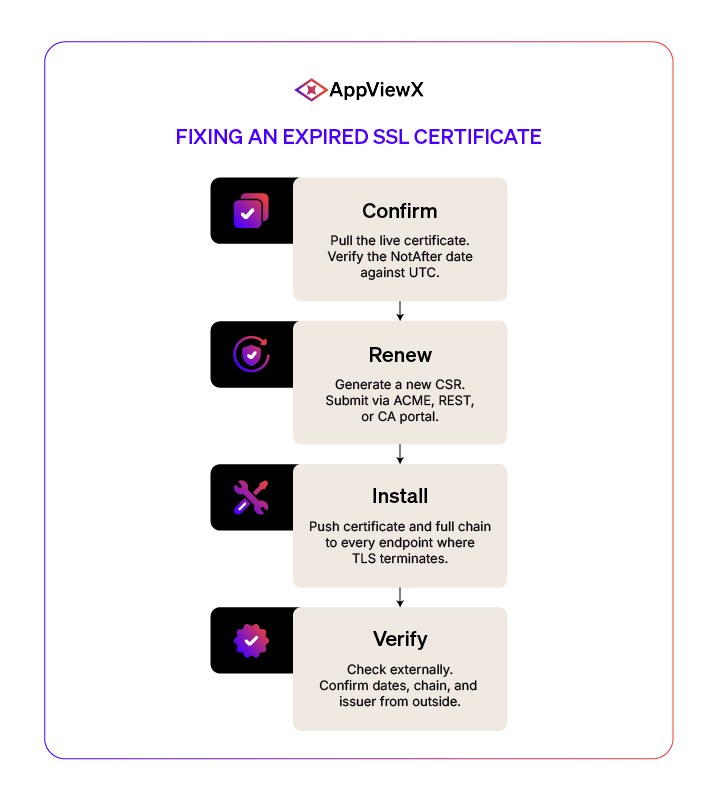
- Fixing an expired SSL certificate takes four steps you’ve done before. Confirm it’s actually expired, renew with a new CSR, install the certificate and full chain everywhere it lives, then check it from outside your network. The renewal itself almost never breaks.
- What gets you is everything downstream. Keys that don’t match the new certificate, missing intermediates, HSTS that won’t let users click through, and mobile apps still pinned to the old certificate. Each one has a fix that takes about ten minutes once you spot it.
- By 2029, 47-day certificate lifespans mean you’ll be renewing public TLS certificates eight times a year, thanks to the CA/Browser Forum schedule. NIST’s finalized post-quantum standards add algorithm migrations across the same inventory on top of that. At that volume and complexity, tickets and runbooks won’t hold.
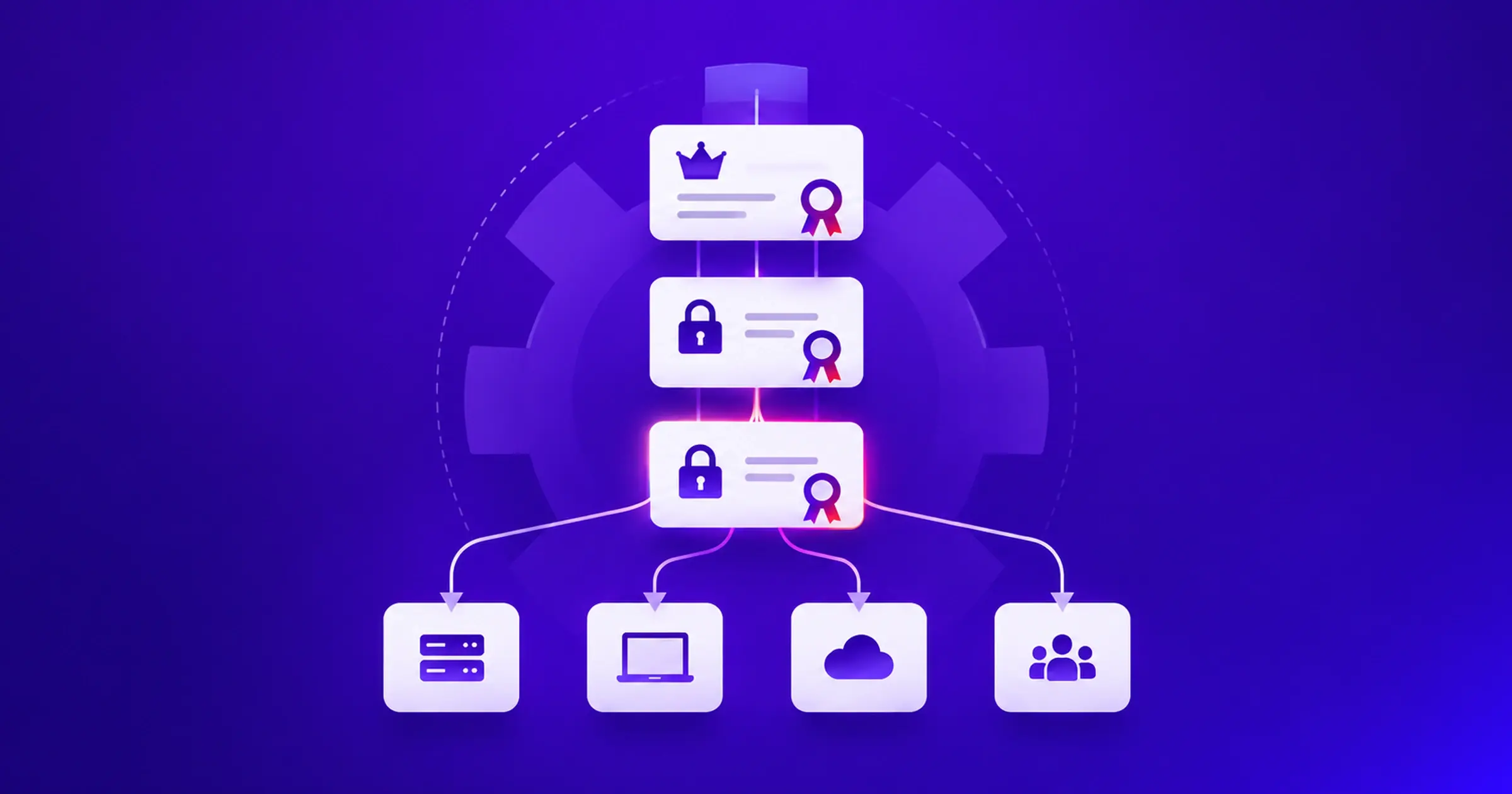
- CLM handles this in four pieces: discovery, inventory, automated renewal, and the agility to swap CAs or algorithms without rewriting everything. Outages almost always show up in the seams between two of them.
Fixing an expired SSL certificate is a four-step job: confirm the expiration, renew with a new CSR, install the certificate and full chain everywhere it terminates, and verify externally. The hard part is what happens after the renewal, and what happens when you’re running this loop eight times a year per certificate by 2029.
Confirm certificate expiration
Not every “certificate error” is actually an expiration. Confirm the real fault before you renew, because re-issuing a certificate that was not the problem just adds time to the outage.
The error messages your users are seeing
What your users see depends on the browser, and the string itself usually tells you whether expiration is the right diagnosis or you should keep looking:
- Chrome and Edge: NET::ERR_CERT_DATE_INVALID
- Firefox: SEC_ERROR_EXPIRED_CERTIFICATE or MOZILLA_PKIX_ERROR_NOT_YET_VALID_CERTIFICATE
- Safari: This Connection Is Not Private, certificate has expired
- Command-line clients: certificate has expired, or alert certificate has expired
- Java applications: PKIX path validation failed, NotAfter
Confirm expiration, not revocation, chain failure, or clock skew
Pull the live certificate from outside your network and check the NotAfter date against UTC. If it is in the past, you have a real expiration. But if the date is valid and browsers still throw errors, one of three other things is wrong:
- Revocation: OCSP or CRL has marked the certificate revoked, so the fix is re-issuance, not renewal.
- Broken Chain: The leaf certificate is valid, but the server is missing an intermediate certificate or serving an expired one, and most clients will not fetch it for themselves.
- Clock skew: The server or client clock is out of sync, so a valid certificate reads as expired or not-yet-valid, and the fix is syncing against an authoritative NTP source like time.nist.gov.
Mature certificate monitoring catches all three before users do, by continuously polling endpoints and comparing what the certificate claims against what the server actually presents.
How to renew an expired SSL certificate
Renewal means re-issuing the certificate against a new CSR. Most public CAs allow renewal with the existing private key, but generating a new key pair every time is the safer default and aligns with NIST SP 800-57 key lifecycle guidance.
Generate a new CSR
Generate a fresh private key and CSR. For most public TLS, that is a 2048-bit RSA key or an ECDSA P-256 key. The CSR carries the subject, the organization details, and the Subject Alternative Names (SANs) that the certificate needs to cover. Modern browsers ignore the Common Name entirely, so the SAN list is what actually matters.
Two rules sit above the cryptographic choices:
- Store the private key with strict file permissions so only the service account that needs it can read it.
- Never email it, paste it into a ticket, or commit it to source control. A private key that touches a help desk ticket is a compromised key.
Submit the CSR and complete domain validation
Submit the CSR through your CA’s portal, API, or ACME endpoint. For automated environments, ACME (RFC 8555) is the standard, and Let’s Encrypt alone issues over 6 million certificates per day through it. Domain Control Validation typically uses DNS-01, HTTP-01, or TLS-ALPN-01, depending on what your environment supports. For renewals against an existing CA account, validation usually completes in seconds because the account binding is already trusted.
Download and verify the renewed certificate
Download the leaf certificate and the full intermediate chain. Most installation failures trace back to a missing or wrong-order chain at this step.
Verify two things before you deploy:
- The chain validates against the CA bundle, and the dates, subject, and issuer match what you requested.
- The private key matches the certificate. Compare the modulus hashes from each. Identical hashes mean the pair is valid. Different hashes mean the service will not start, and the failure will look like a config bug when it is actually a key mismatch.
At enterprise scale, every step in this section runs through ACME or a REST API call, not a portal session. That is the difference between renewing 50 certificates a year and renewing 50,000. Automation moves the chain assembly and key-cert matching out of human hands, which is where most of these mistakes get introduced in the first place.
Installing the renewed certificate on your server
Every platform has the same goal: swap the certificate without dropping live TLS sessions. The commands differ.
Apache: reload without dropping connections
Update the certificate and private key references (typically SSLCertificateFile and SSLCertificateKeyFile, or a combined full-chain configuration). Run a config test, then perform a graceful reload. New workers pick up the renewed certificate, old workers finish their current connections and drain cleanly.
Nginx: update paths and test config before reload
Nginx typically uses a PEM file with the leaf certificate followed by the intermediate chain in ssl_certificate. Test the config, then send SIGHUP. If you run OCSP stapling, clear the cache after the reload. A stale OCSP response paired with a new certificate triggers soft-fail warnings.
Microsoft IIS: rebind to the correct site and port
Importing the PFX into the certificate store is only half the job. The binding still references the old thumbprint until you update it. Edit the existing binding directly and update the certificate selection to point to the renewed certificate. Enable SNI for any site sharing a port across hostnames. Most IIS renewal failures live here: new certificate in the store, stale binding still pointing at the expired thumbprint.
Load balancers: rotate certs across F5, HAProxy, and AWS ALB
Load balancers terminate TLS for most enterprise traffic, which makes this the highest-impact step in the install:
- F5 BIG-IP: Import the new certificate and key into the crypto store, then update the client-SSL profile, and profile reference updates atomically.
- HAProxy: Use the Runtime API to set and commit, or perform a hitless reload with socket inheritance from the old process.
- AWS ALB: Import the certificate to ACM, modify the listener to reference the new certificate ARN; SNI lets one listener serve multiple hostnames.
This is the last-mile binding step, and it is where most outage stories end. A renewed certificate that has not been pushed to the load balancer, the IIS binding, or the Nginx server block is still an expired certificate to the user. Closed-loop automation handles the renewal and the push as one operation.
The table below shows the server-by-server renewal behavior, with the operational characteristics that matter for live traffic.
| Platform | Renewal operation | Zero-downtime behavior |
| Apache | Update cert directives, validate config, perform a graceful reload | Existing workers drain while new workers load the renewed cert |
| Nginx | Update full-chain path, test config, send SIGHUP reload | New workers spawn while old workers finish in-flight requests |
| Microsoft IIS | Import PFX, update the old binding to reference the new thumbprint | Binding updates take effect without requiring an application pool recycle |
| F5 BIG-IP | Import cert/key into crypto store, update client-SSL profile reference | Profile reference updates atomically, no virtual server restart |
| HAProxy | Set cert via Runtime API and commit, or hitless reload with socket inheritance | Open connections survive the rotation |
| AWS ALB | Import the cert to ACM, modify listener to reference the new certificate ARN | Listener swap is online, SNI certs rotate per-host |
How to verify the fix and resolve common errors
A clean reload does not prove the certificate is serving. Verify externally first, then work through the post-renewal failures that catch most teams.
Browser and command-line verification
Use both. Browser checks miss chain issues that older clients hit. Command-line checks miss HSTS and pinning state that only browsers track. Pull the live certificate from outside your network, confirm the new validity dates, the issuer, and the chain the server presents. Test from at least one geography outside your own, because CDN edge caches can serve a stale certificate for several minutes after origin rotation.
Private key mismatch
- Symptom: the server refuses to start, or starts but serves the wrong certificate.
- Cause: a fresh CSR was generated against a new key, but the renewed certificate was installed next to the previous key.
- Fix: locate the matching key, or re-issue with a CSR generated from the key the server holds. Confirm with a modulus hash comparison before reloading.
Broken intermediate chain
- Symptom: the certificate works in Chrome on a corporate network and fails on older Android, Java, or Go clients.
- Cause: a missing or out-of-order intermediate chain. Desktop browsers can fetch a missing intermediate from the AIA URL in the leaf, most other clients cannot.
- Fix: rebuild the chain file with the leaf first, intermediates in order toward the root, no root included.
HSTS and certificate pinning conflicts
HSTS tells the browser to refuse any TLS error without a click-through bypass. Preload HSTS plus a broken certificate equals users locked out. Fix the certificate. Disabling HSTS does not remove the previously cached policy; browsers will still enforce it until the cached max-age expires, and auditors may flag the change.
For mobile apps, public-key pinning remains standard even after HPKP was deprecated in browsers. A pin to a specific leaf or intermediate can break client connectivity after renewal. . If pinning is used, it should be done carefully, typically to a small set of backup keys with a clear rotation plan, rather than to a single leaf certificate.
Every failure mode here has a known fix. The harder problem is catching them before users do, which is the job of continuous certificate monitoring.
Common post-renewal failure modes, deterministic diagnosis, and the fix are given below:
| Symptom | Root cause | Diagnosis | Fix |
| Server refuses to start | Private key does not match certificate | Compare modulus hashes of cert and key | Re-issue with CSR from the correct private key |
| Some clients fail, others succeed | Missing or wrong-order intermediate chain | Inspect the chain presented by the server | Concatenate leaf, then intermediate into a full chain |
| The browser shows a date error after installation | Server clock skew or wrong cert in binding | Check system time and active binding thumbprint | Sync NTP, rebind the correct cert to the site |
| Mobile app breaks, web works | Certificate pinning to the leaf or intermediate | Inspect app pin configuration | Update app pin set or use a rotation-friendly pinning strategy (backup pins, SPKIs) |
| Users cannot bypass the warning | HSTS preload with bad cert | Check HSTS header and preload status | Restore a valid cert, do not disable HSTS |
| OCSP soft-fail warnings | Stale or missing OCSP staple paired with new cert | Inspect the stapled OCSP response | Reload/restart the server to refresh the OCSP staple and fetch a fresh response |
Why are expired SSL certificates becoming harder to prevent?
Renewal mechanics have not changed. The conditions around them have.
Certificate validity is shrinking fast
The CA/Browser Forum Ballot SC-081v3 put public TLS validity on a downward curve: 398 days to 200 in March 2026, 100 in March 2027, and 47 by March 2029. The motion was proposed by Apple and endorsed by Google, Microsoft, and Mozilla. All four major browser vendors voted yes.
Hybrid and multi-cloud environments multiply renewal touchpoints
A modern enterprise terminates TLS on web servers, load balancers, ingress controllers, service meshes, API gateways, mobile clients, IoT firmware, mTLS between microservices, and SaaS endpoints. Every one of those is a different place a certificate can expire, often with an owner who does not know it exists. Inventory accuracy at this scale is what continuous discovery is for.
Manual workflows do not scale with shorter lifespans
An enterprise inventory in the tens of thousands generates renewals every minute of every working day. Anything routed through a human ticket becomes the bottleneck. Add NIST’s August 2024 finalization of FIPS 203, 204, and 205, and the NSA’s CNSA 2.0 advisory, and the renewal load arrives alongside an algorithm migration. Neither happens through tickets.
The four stages of certificate lifecycle automation
Every CLM platform renews certificates. Four capabilities decide whether renewal holds up at enterprise scale, and skipping any one weakens the others.
Discovery
Discovery means scanning every place a certificate can live: network ranges, cloud accounts across AWS, Azure, and GCP, Kubernetes clusters, load balancer configurations, and certificate transparency logs. Without continuous scanning, certificate lifecycle management runs on a stale inventory.
Centralized inventory and ownership
Discovery without ownership is just a longer spreadsheet. Every certificate needs an accountable owner, an application tag, an environment tag, and an expiry SLA. Ownership tagging is what turns a unified CLM platform from a scanner into a system of record.
Policy-driven renewal automation
Renewal automation that asks a human to click approve is not automation. Policy-driven renewal means the platform decides when to renew, which CA to use, what key type, what validity, and where to push the result, based on rules you set. ACME, REST APIs, and native integrations with F5, Nginx, IIS, AWS, Azure, and ServiceNow take the human out of the loop.
CA-agility and crypto-agility
If a CA is distrusted, breached, or too expensive next quarter, can you migrate 50,000 certificates to another CA without rewriting your automation? That is CA-agility. If NIST mandates a PQC algorithm transition, can you swap key types across your inventory without re-architecting your platform? That is crypto-agility. Post-quantum cryptography readiness is the part that does not work as a retrofit.
Build resilient SSL certificate management with AppViewX
This guide walked through fixing one expired certificate. AppViewX runs that workflow on a schedule, across every endpoint, policy-driven instead of ticket-driven.
AppViewX generates the CSR, submits it through ACME, REST, EST, or SCEP, installs the renewed certificate on Apache, Nginx, IIS, F5 BIG-IP, HAProxy, and AWS ALB through native integrations, and verifies the install with continuous monitoring that catches private key mismatches, broken intermediate chains, HSTS lockouts, and stale OCSP staples within minutes. The same automation extends to post-quantum cryptography readiness, so when NIST’s algorithm migration lands, it runs through the same workflow as a renewal.
The fix in this guide works.

Tags
About the Author

Krupa Patil
Product Marketing Manager
A content creator focused on providing readers and prospective buyers with accurate, useful, and latest product information to help them make better informed decisions.